

Unlock cosmetics in Collect
Make the 48 cosmetics in the collection available, then pick your favorites through the normal Collect menu. Choose a different item in each group without spending diamonds on individual unlocks.

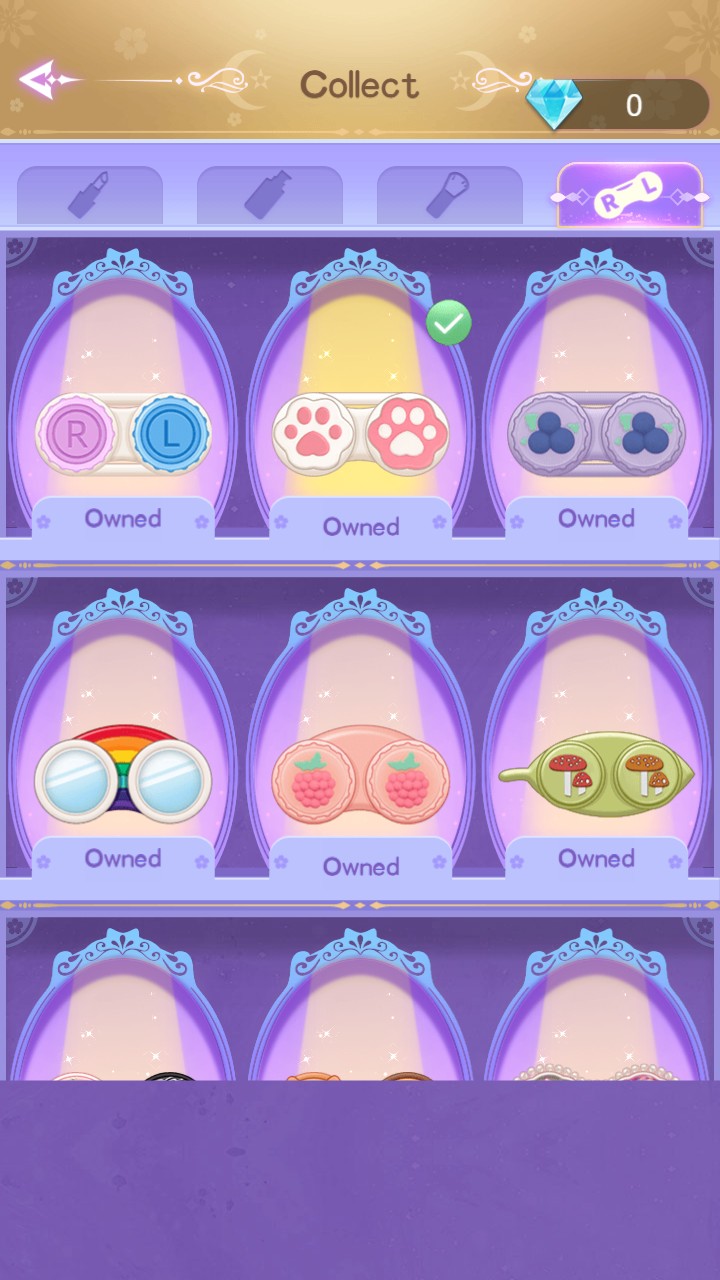
Choose unlocked cosmetics
Select a paw-print lens case in Collect, with the displayed items owned and zero diamonds spent.
Four groups of cosmetic choices
The collection includes 12 choices per group: lip products, foundation bottles, brushes and lens cases. Use the tabs in Collect to browse each group.
Select an item to move the green check to your choice. Unlocking the collection leaves the selection up to you.
Available customise
Unlock cosmeticsFree
Unlock all 48 cosmetics across the four collection groups.
Apply Unlock cosmetics, open Collect from the home screen, then tap an owned item to select it.
Questions about customise
- Is Unlock cosmetics free?
- Yes. Unlock cosmetics is a Free customization action.
- Does it choose my cosmetics for me?
- No. After unlocking, open Collect and select the items you want.
- Does unlocking cosmetics finish the makeover story?
- No. Story progress and makeover tasks remain separate from the cosmetic collection.
Using these features
Choose the feature in the Windows app after connecting your game. Check its requirements before making a change.
Setup for Makeup Stylist →